reflo
Motion-capture pilates personal training: real-time form correction and AI voice coaching, built for the phone and designed for what comes next.
Best experienced on a mobile browser. Open in Safari or Chrome on your phone and allow camera access. The live workout screen has a skip button to jump to the last 15 seconds for demo purposes.
The Problem
Reformer pilates is one of the most effective ways to train, and one of the least accessible. Classes run $40 to $70 a session, and beginners, the people who most need eyes on their form, are exactly the ones priced out. The alternative is practicing alone off a video that can't see you, which is how bad habits and injuries start.
Reflo isn't built to replace the studio. It's built to be your homework between sessions, so you arrive at real classes with cleaner fundamentals and get more out of the money you're already spending. It watches your movement through your phone's camera and coaches your form with a real voice, in real time.
The phone is just the entry point: the most accessible camera most people already own. The interaction model underneath (persistent body tracking, spatial overlays, audio feedback tied to movement) is the same foundation that will power AR glasses, smart mirrors, and movement-aware wearables. This is the first accessible step toward that.
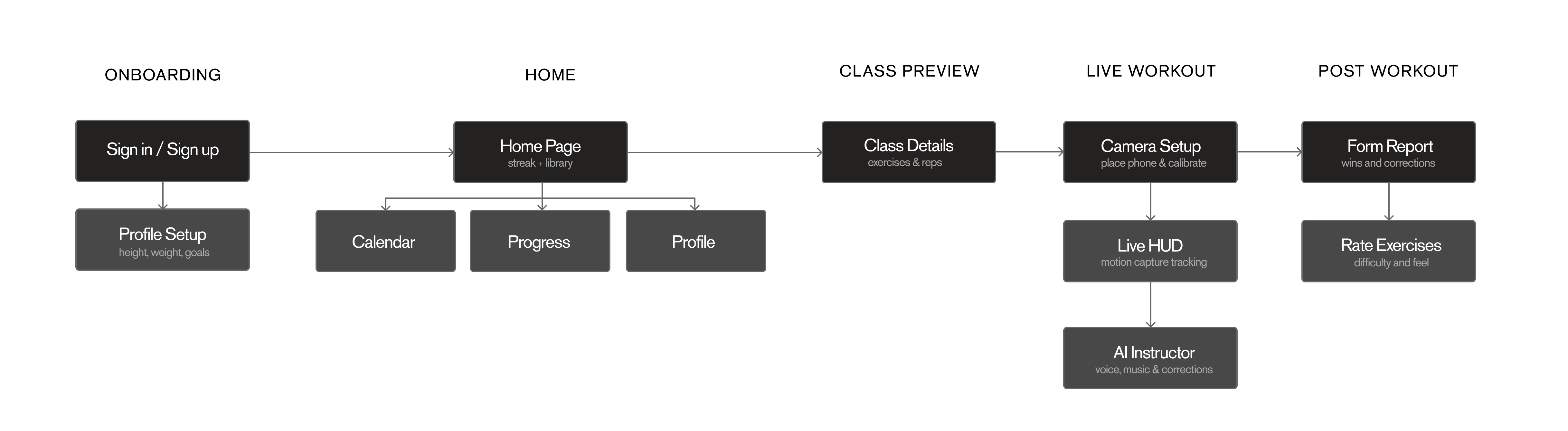
User Flow
From Sketch to Ship
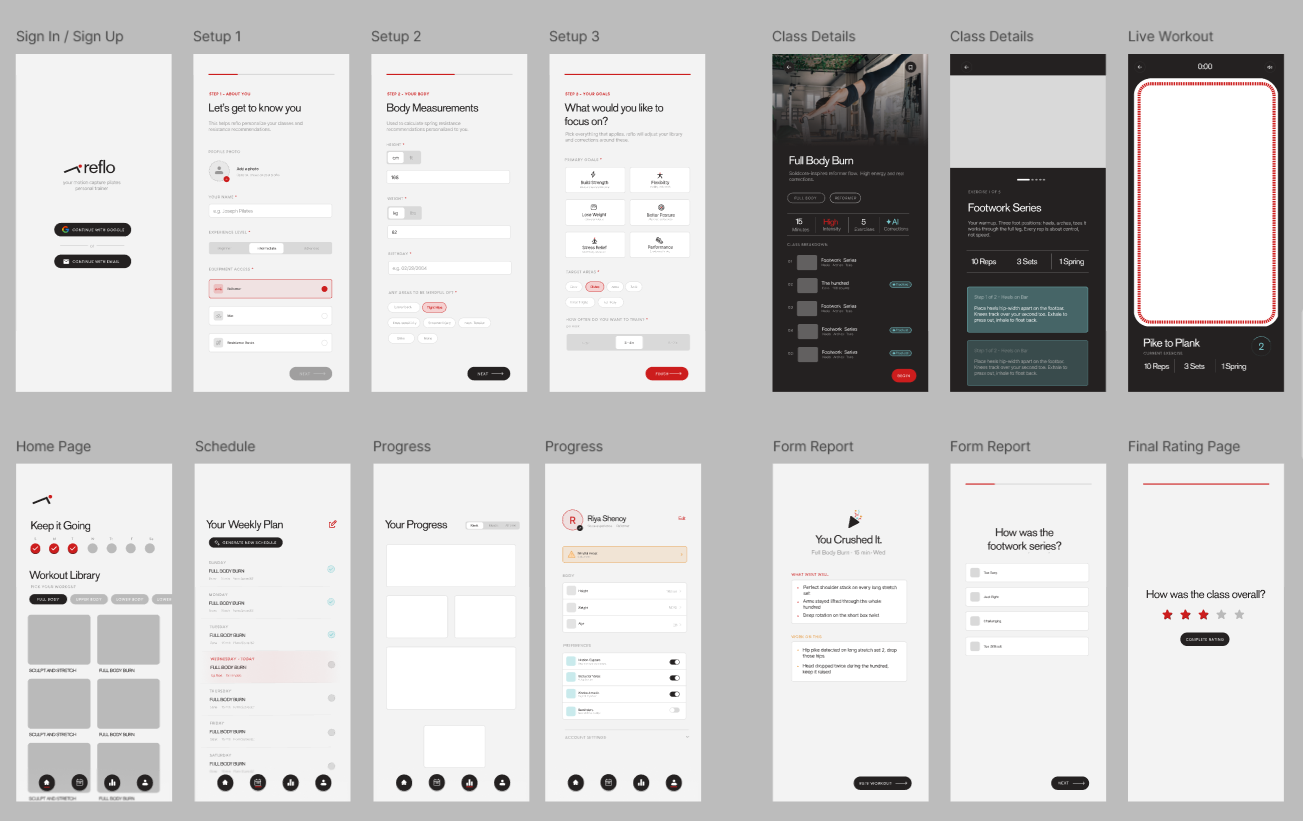
Every screen started as a low-fidelity wireframe and was reviewed against the flow before any code. Here's the journey from first sketch to shipped interface.
Design System
A system built before the branding pass, so every screen stays consistent. Color, type, and mark each carry a single defined job.
Click a card
Signal Red
The single high-weight color. CTAs, today's session, active states, form errors. Used sparingly so it always means one thing: act, or pay attention. It's also the dot in the logo, a tracked joint, echoed as a 4px square throughout the UI.
How It Works
Body tracking
The browser's getUserMedia API streams the camera feed. MoveNet SinglePose Lightning detects 17 body landmarks every frame, computing joint angles entirely on-device with no server round-trip.
Spatial overlay
A canvas layer over the live feed draws the skeleton in real time: red while tracking is active, shifting to teal the moment a correction fires, dimming to grey when confidence drops or the body leaves frame.
Contextual coaching
When a joint angle crosses a threshold, a correction is queued and fires in the next gap in the audio track, never over the instructor. Positive feedback plays when form stays clean.
Detection Logic
Three exercises are tracked in this MVP. Joint angles are computed every frame using dot-product math against known landmark positions. A 5-frame rolling average smooths jitter; corrections queue continuously and fire only in silent windows.
Long Stretch
Hip pike > 195°
Drop hips down, squeeze the glutes
Long Stretch
Hip sag < 160°
Squeeze glutes and lift hips back up
Long Stretch
Head drop detected
Curl higher, chin away from chest
The Hundred
Head drop detected
Curl higher, chin away from chest
The Hundred
Arms sinking below hip
Lift arms up, hovering not resting
Footwork Toes
Heels dropping
Keep heels lifted through every rep
Footwork Toes
Knees caving inward
Push knees out over second toe
Working With Instructors
Reflo has been developed in ongoing consultation with certified pilates instructors, shaping the exercise library, validating that the correction cues match how they actually teach, and pressure-testing the concept itself.
Their most important pushback shaped the entire positioning: people go to studios for community and the felt, hands-on correction a camera can't replicate, and Reflo should never try to replace that. So it doesn't. Reflo is framed as homework, not a substitute: it catches the gross positional errors that are visible from a side view (piking, sagging, dropping) so beginners build cleaner fundamentals between the classes they're already paying for, and get more out of every session.
That collaboration also drew the scope lines honestly. Detection is deliberately limited to the exercises where side-view tracking is reliable, rather than faking confidence on rotational or depth-based movements a single camera can't see. And the per-rep timing that paces generated workouts is calibrated with instructors rather than guessed, because tempo, holds, and breath-paced movement are the parts of pilates that generic rep-counting gets wrong.
Tech Stack
Expo SDK 56
App framework + web build
TypeScript
Language
React Navigation
Stack + bottom tabs
getUserMedia API
Browser camera access
MoveNet Lightning
Real-time joint detection
TensorFlow.js
ML runtime
OpenAI TTS
Generated workout voice
ElevenLabs
Flagship voice + corrections
Anthropic API
Routine generation
Firebase
Auth + Firestore
Work in progress
Reflo is an active build. The core loop (track, coach, generate, save) works end to end. Remaining work is validation and hardening, not new systems.
- ·
MoveNet pose detection with color-coded skeleton and joint-angle thresholds
- ·
Correction window system, audio queued to silent gaps
- ·
Flagship class: hand-produced ElevenLabs voice track with music
- ·
AI routine generation: Anthropic composes weekly plans from a tagged exercise library
- ·
Generated-workout voice via OpenAI TTS, paced from rep counts, quota-limited
- ·
Real session data driving streak, progress, and calendar
- ·
Firebase auth, 3-step onboarding, post-workout report
- ·
Out-of-frame detection and lock-on gating
- ·
Vercel web deployment with mobile viewport
- ·
Expanding tracked exercises beyond the current three
- ·
Instructor-calibrated per-exercise rep timing
- ·
Cached generated audio (Firebase Storage) to cut regeneration
- ·
iOS development build via EAS
- ·
WebXR exploration for true spatial overlay
Challenges & Learnings
Choosing the pose model
MoveNet SinglePose Lightning was chosen over MediaPipe BlazePose after testing both in-browser. Lightning's lower inference cost held a steadier framerate on mid-range phones, which mattered more here than BlazePose's extra landmark precision. The angles being measured only need shoulder, hip, knee, ankle, and wrist.
Timing corrections and cues with the audio
The hardest product problem was making AI feedback feel natural alongside voice coaching. For the flagship, corrections fire only in pre-mapped silent windows. For generated workouts, the pacing is computed from each exercise's rep count so cues, work time, and corrections never overlap.
Two voice paths, one pipeline
The flagship class is a hand-produced ElevenLabs track, the polished front door. Generated routines use OpenAI TTS composed on demand and metered by a weekly quota, since live generation is the only real cost. A voiceMode branch routes both through the same tracking and HUD, so the experience is consistent while cost stays controlled.
Validating the AI, not trusting it
Routine generation never writes model output directly. Every exercise reference is validated against the real library, rep and set counts are bounds-checked, and any failure falls back to a deterministic local plan, so a bad generation degrades to a working workout instead of a broken screen.
Constraining to side-view only
Rather than chase every camera angle, the app is designed around a single side-view constraint. It made the joint-angle thresholds far more reliable, cut false positives, and mirrors how purpose-built movement hardware approaches camera placement.